


Opera One Gets New Vertical Tab Improvements With Easier Tab Islands
Opera One’s latest update improves vertical tab management with a new New Tab button position, better active-tab visibility, easier Tab Islands, and smoother tab closing.
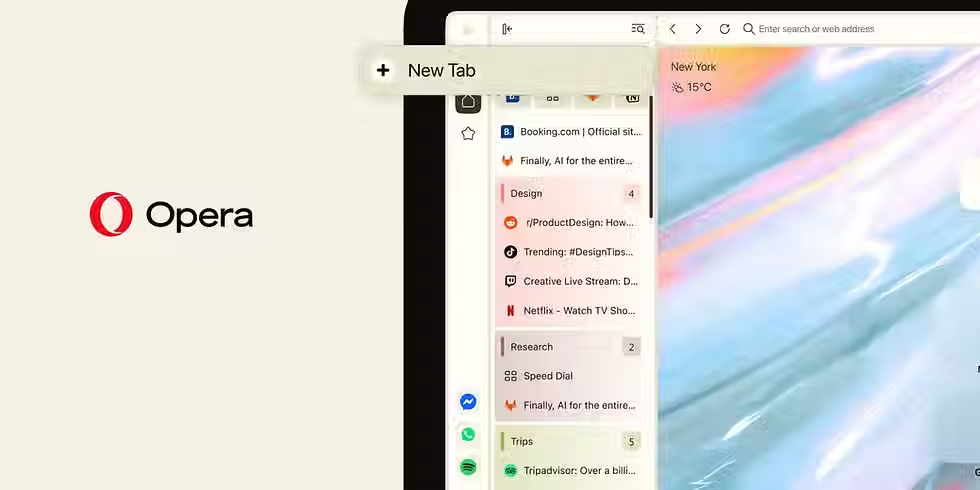
The Opera team is working on the latest update to Opera One, which offers some exciting updates for its vertical tab system. This particular update aims to make the process of tab management easier for those who tend to use Opera One to browse many tabs at once.
For instance, there have been some important changes regarding the placement of the New Tab button within the vertical tab strip. Now, the button is located at the very top of the tab strip, while newly created tabs will be added just below it. As stated by Opera, the purpose of this change is to simplify the process of tab management for those who use the vertical tab system.
Users who do not want to get accustomed to the new tab layout can easily revert to the previous one. To achieve that, all you need to do is go to the Easy Setup.
The update makes the current tab more visible by enhancing the contrast of the area near the tab itself. It would be much easier to find out which of the opened tabs is used now, especially when there are many tabs opened.
Tab Islands received some improvements from the developers of Opera as well. New functionality of Tab Islands involves using a special plus sign for adding tabs into one island. Also, users can unite tabs easily by just dragging one tab onto the other, thus creating new Tab Island. It will help people to unite websites in a quick manner without using tabs separately.
Finally, it became easier to close tabs in the collapsed tab strip. This problem was among the minor but still important ones that were solved by the developers of Opera.
So, the latest Opera One update is all about improving the process of working with vertical tabs. Improved visibility of tabs, their easy union and fast closing make the browser easier to use.


Comments