


Android 17 Leak Reveals Major Design Changes Coming to Pixel Phones
- Utshab Biswas

- Feb 5
- 4 min read
Even as the rollout of Android 16 is still in progress on eligible devices, rumors of Android 17 have already started surfacing online, giving us a first look at what Google might have in store for the next version of Android. Several screenshots, allegedly taken from Pixel phones running an internal build, seem to indicate that Android 17 will be all about refining the look and feel of the operating system. While most of these changes will likely be limited to Pixel phones or AOSP skins, they do give us a good idea of the direction Android is headed in 2026.

Stronger Blur and Translucent Visual Effects
Among the most apparent improvements rumored in the leaks is the addition of blur and translucent effects throughout the system UI. The Material 3 Expressive design in Android 16 has already brought some blur effects to the system UI, such as the app drawer, notification shade, and recent apps screen. Android 17 seems to take this design language even further.
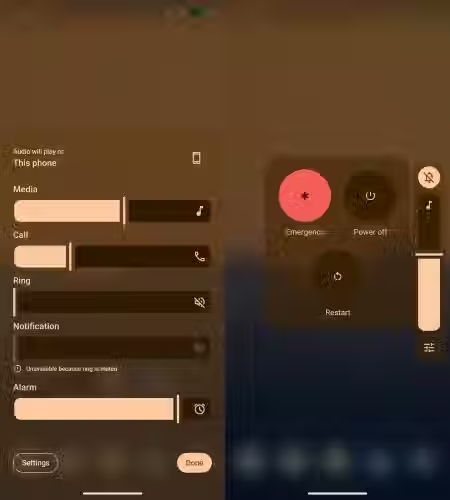
According to the leaked screenshots, the translucent blur gradient effects are likely to be introduced behind the volume slider, volume panel, and power menu, instead of the usual flat light or grey background. This means that whenever a user accesses the volume settings or power menu, the background will dynamically blur while still showing some hints of the underlying app or wallpaper.
Although such glass-like aesthetics are new to Google’s Pixel interface, other Android manufacturers have experimented with similar visual styles for years. Bringing this design natively into stock Android could finally modernize the Pixel UI and align it with broader industry trends.
Split Quick Settings Panel for Familiar Navigation
Another significant change that is expected to come with Android 17 is the new quick settings panel. With the new layout design introduced by Android 16, Android 17 may bring the feature of switching between Combined and Separate quick settings panels.
Combined Panel:
The notifications and quick settings tiles will be displayed together on a single screen, just like the classic stock Android design.
Separate Panel:
To access the notifications, the user needs to swipe down from the left side of the screen, while to access the quick settings toggles, the user needs to swipe down from the right side of the screen.
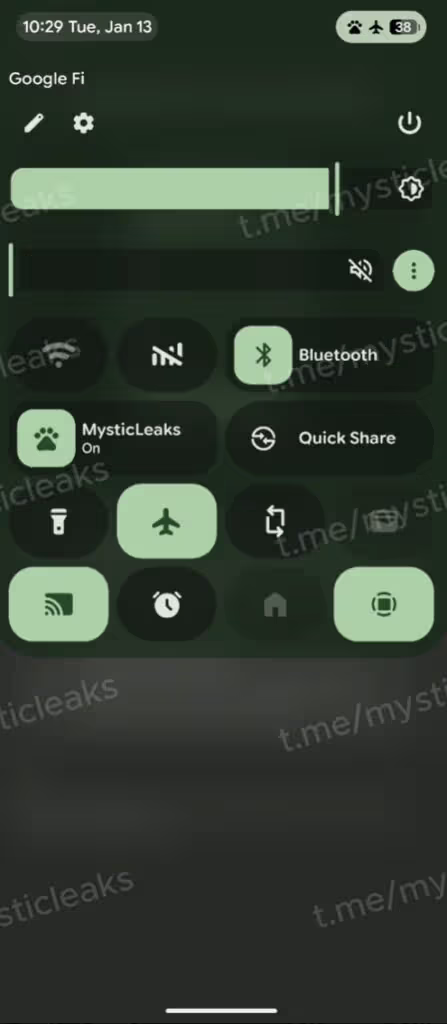
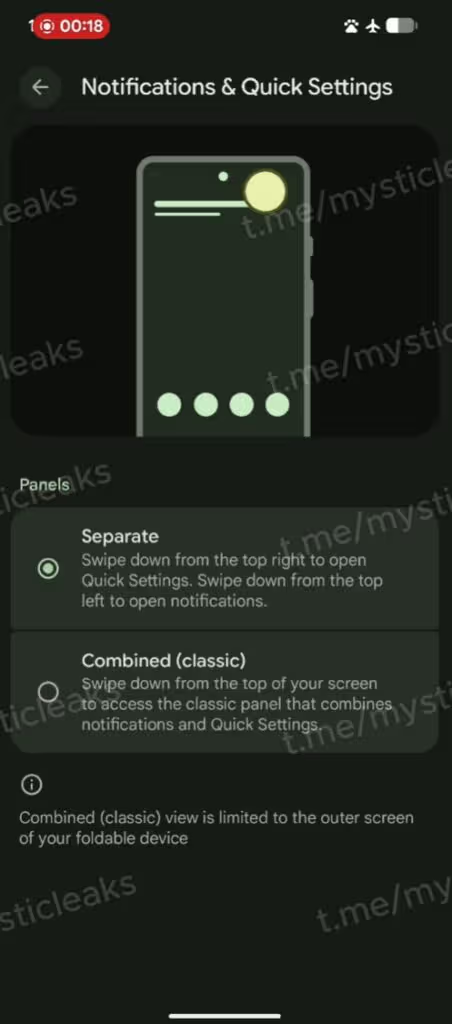
This two-panel design is already quite common in many popular Android skins. This will make it easier for people who are used to other Android skins to get comfortable with Pixel phones right away.
Native App Lock Directly From the Home Screen
Security and privacy could also see significant improvements. Android 17 may bring a native app lock feature that can be accessed right from the home screen, which is something that stock Android has not provided before.

This feature already exists in other skins such as ColorOS, OxygenOS, and Nothing OS, which allow users to lock their sensitive apps using biometric authentication, PINs, or passcodes. If this feature is rolled out with Android 17, users will no longer need to rely on third-party app lockers.
A separate settings panel for handling locked apps will also be introduced.
Enhanced Screen Recording With Annotation Tools
Recording the screen on stock Android has always been a straightforward and minimal process. The latest versions of Android now give users the option to either record one app or the entire screen. Android 17 could greatly enhance this feature.
Rumors indicate that when the screen record toggle is tapped, a floating control panel with a pill design could appear. Although the basic features of screen recording will not change, a doodle or annotation feature could be introduced, allowing users to annotate the screen while recording.

This feature would be particularly helpful for creating tutorials, professional presentations, and educational videos directly from a smartphone, making stock Android much more comparable to the advanced screen recording features that have been available in some manufacturer skins.
Option to Hide App Icon Names
For users who like to have a clean and minimal home screen, Android 17 could finally bring the feature to hide the text of app labels completely. This is a small but important personalization feature that shows Google’s increasing interest in visual customization on the Pixel experience.
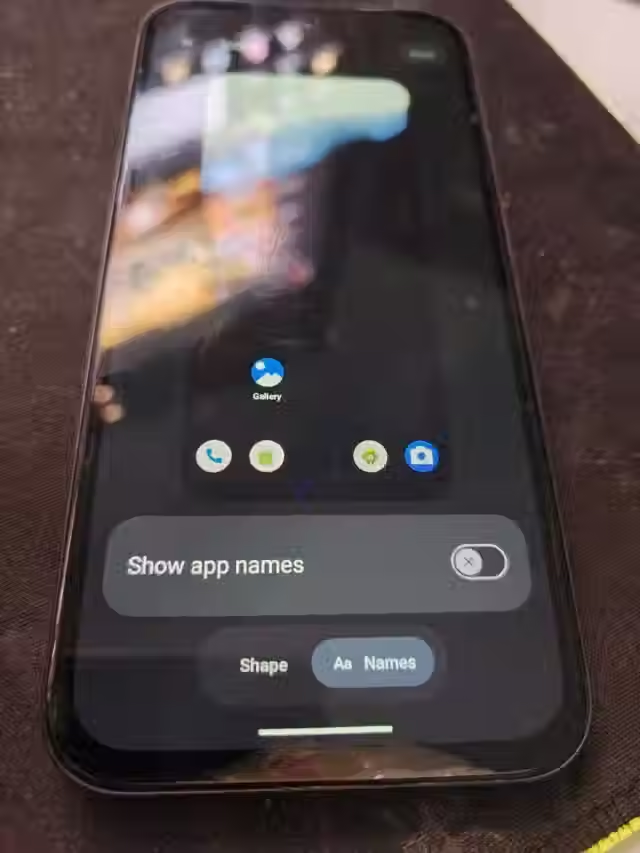
Removing the names of icons can give a clutter-free look and help wallpapers and widgets take center stage.
Expected Release Timeline and Supported Devices
Google has always given priority to Pixel smartphones for the launch of new versions of Android, and Android 17 is expected to follow the same trend. Since the launch of Android 16 is expected to take place in June 2025, it is likely that Android 17 will also be launched in the middle of the year.
Developers and tech enthusiasts can also get their hands on the new version of Android before its official launch through the Developer Preview program, which may start as early as February 2026, followed by beta releases in the months leading up to the official launch.
Android 17 is expected to support Pixel smartphones from the Pixel 6 series to the Pixel 10 series, while the new Pixel 11 series may come with the new version pre-installed.
The new version of Android is also expected to be announced at Google I/O 2026, where Google may also demonstrate its advancements in Gemini AI, productivity, and other areas.
Going by the current leaks, it seems that Android 17 is going to be an improvement-oriented update rather than a complete makeover. Google is apparently committed to fine-tuning the look and feel, usability, and long-overdue privacy-related features all without compromising the flexibility and customizability of Android.
The distinct quick settings design, built-in app locking functionality, improved screen recording capabilities, and contemporary translucent design language combined indicate a more mature and user-friendly Pixel UI. If these features do make it to the final cut, then Android 17 could very well offer one of the most well-rounded upgrades in the recent history of Android.
As always, the final set of features might change before the official launch, but even this initial preview indicates that Android fans have a lot to look forward to in 2026.


Comments